
A familiar phone.
A story worth keeping.
Phone stories let someone talk with Journal’s AI companion over a phone call. Their stories go to the journal chosen during setup, with the transcript and recorded audio.
Controlled pilot: Phone stories are being tested with a small group. Text invitations are awaiting messaging approval and are not currently available.
Start with a journal
- Open a journal’s settings and choose Phone calls.
- Connect your own phone, or set up a storyteller’s participation. Choose the journal that will receive their stories.
- Complete the phone setup and consent steps. Setting up someone else’s number does not opt them into text messages.
Calls are recorded and transcribed so the storyteller’s own voice can be kept with their words. Stories are added to that day’s entry. The journal’s sharing settings determine who can access them.
Optional text invitations
When available, you’ll be able to choose the days, time, and time zone for story reminders in the app. You must explicitly agree to text invitations before they start. Participation is optional, and consent to messages is not a condition of purchase.
Message frequency follows your selected schedule, with additional messages when you reply or snooze an invitation. Message and data rates may apply.
An invitation will ask whether you have time for a story. We only start the reminder call after you reply YES to a current invitation.
| Reply | What happens |
|---|---|
| YES | Reply within 30 minutes of the invitation to request a call. An expired invitation won’t start a call. |
| LATER | Get one more invitation in 30 minutes. |
| STOP | Stop text invitations and scheduled calls to your number. |
| HELP | Get help with the messaging program. |
Restarting texts does not automatically restart a reminder schedule. Review your reminder settings in the app before resuming.
How consent is collected
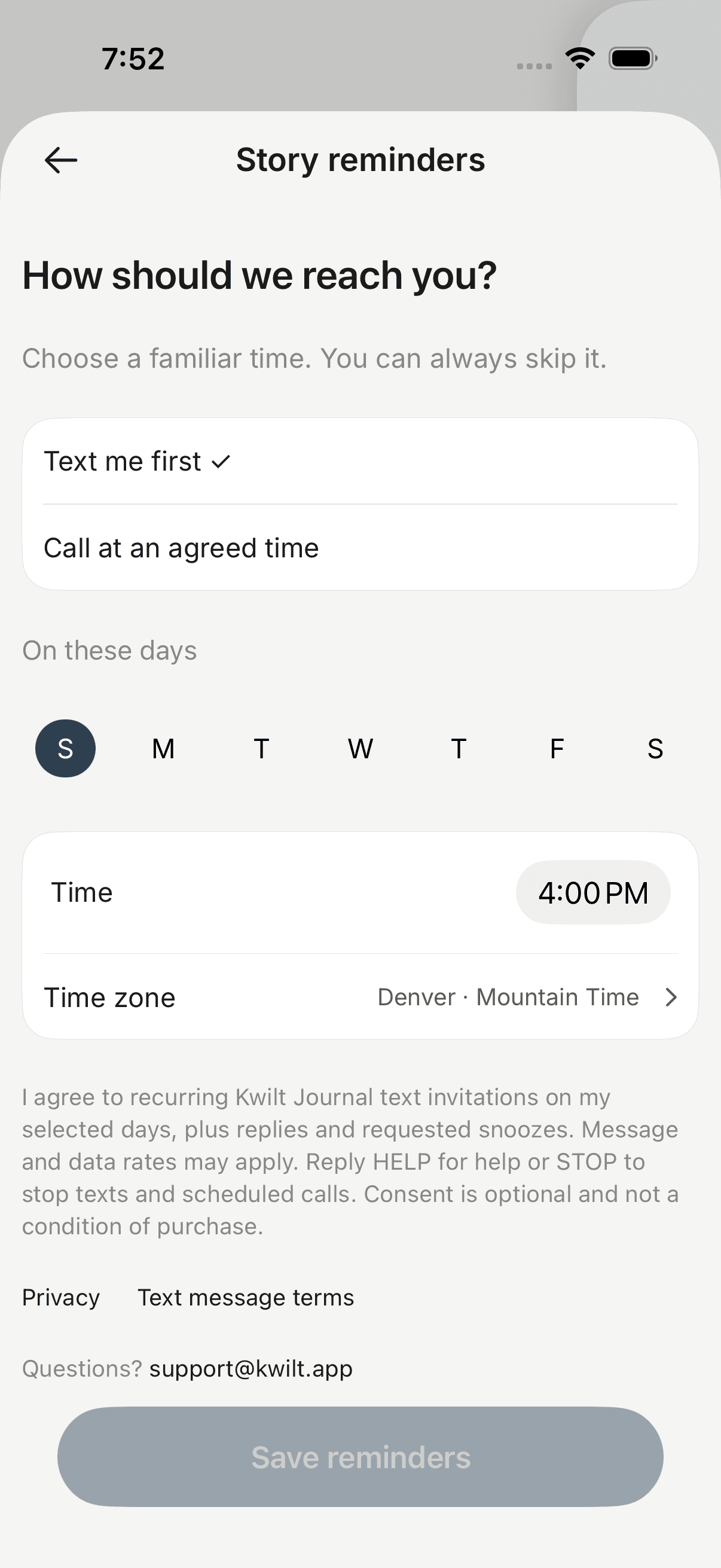
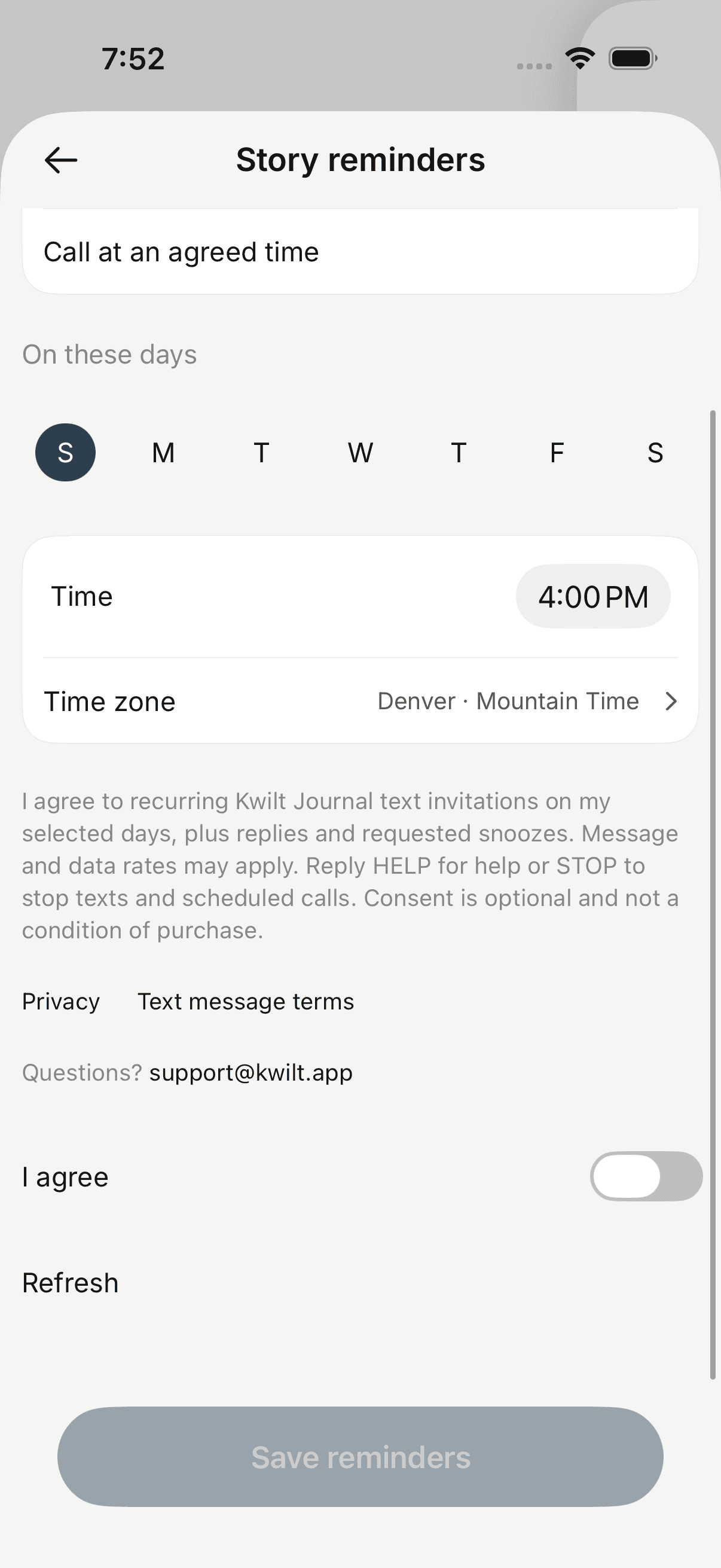
For your own linked phone, open Phone calls, choose Story reminders and select Text me first. Choose your days, time and time zone. Review the disclosure and policy links, turn on the initially unchecked I agree switch, then tap Save reminders. Entering a number or joining a journal does not subscribe you to texts.
These are screenshots of the app’s consent flow using fictional sample data. Text delivery remains disabled until messaging approval. The updated disclosure shown here is prepared for the pilot release.
When someone sets up reminders for you
A journal owner can propose a schedule, but cannot consent to texts for you. The proposal stays pending until an expected setup call verifies your identity and asks whether you want texts on the proposed days, time and time zone. The call explains that replying YES requests a call, silence does not, message and data rates may apply, and STOP stops texts and calls. You must say yes to accept. We record that consent event with the schedule.
Text message terms
Read the full Kwilt Journal SMS Terms & Conditions.
Kwilt Journal is operated by Kwilt Labs LLC. Text invitations are optional, recurring service messages for people who explicitly opt in. Frequency follows your selected schedule, with additional replies and requested snoozes. Message and data rates may apply. Consent is not a condition of purchase.
Reply STOP to cancel text invitations and scheduled calls. Reply HELP for help or email support@kwilt.app. Delivery and timing depend on your carrier and service availability; carriers are not liable for delayed or undelivered messages. See our privacy policy for how we handle your phone number and consent.
Your participation, your choice
You can change or pause reminders in the app. If you are helping a family member get started, let them decide whether to participate and who they want to share with. They don’t need to accept text invitations to take part in phone storytelling.
Questions or help?
Email support@kwilt.app. Read the Journal privacy policy and terms of service.